AI spam filter for Apple Mail.
Private, secure and on your Mac.

365 spam emails. One interruption a day. A year of stolen attention. 23 minutes to refocus after one interruption, per Gloria Mark's research at UC Irvine (2008). Multiplied by 365 days, that's 17 workdays a year.
Your plan renewed. Parcel held: fee due. Security alert: act now
Klar works inside the Mail app you already use.
We noticed a sign-in to your account from a new device in another country. If this was not you, confirm your identity within 24 hours or your account will be locked. Verify your details here…

- 100+
- languages
- Instant
- filtering
- 100%
- on-device
How it works
-
You install it
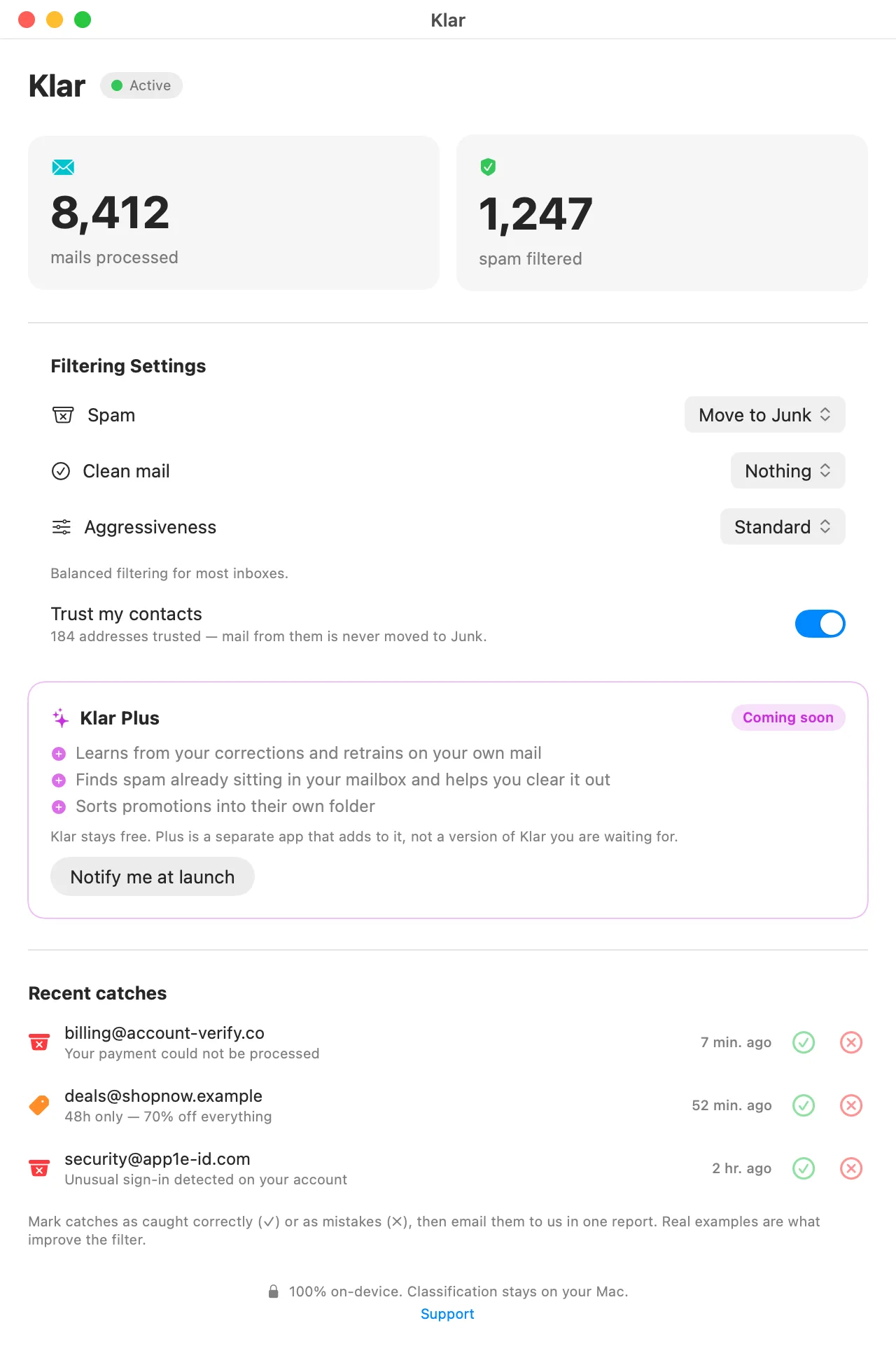
Install from the App Store and switch it on in Mail. No account, no cloud, nothing to configure.
-
It filters on arrival
Klar checks each message the moment it arrives and moves spam and phishing to Junk. Automatically, in the background.
-
You stay in control
Three sensitivity levels, from Cautious to Aggressive. Spam is moved to Junk, never deleted, so nothing is lost.
-
Its AI is small, not generative
Small BERT-family models label each message as spam or not. They never write or summarize anything, and they run on your Mac. Your mail goes nowhere unless you send a report yourself. Klar Plus has an optional second opinion, off until you switch it on. For a doubtful message it sends a trimmed copy, names and addresses removed, to a hosted model at TypeSafe. Only the answer is kept.
One model, on your Mac.
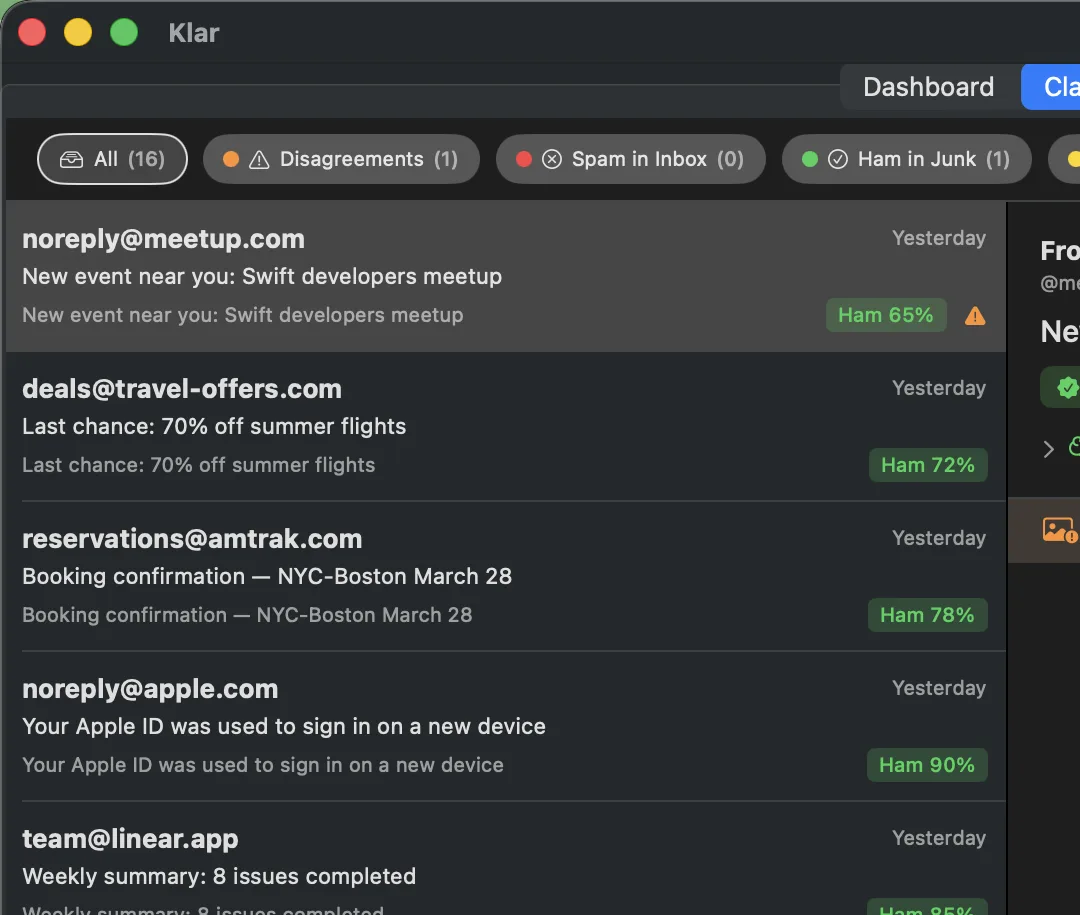
Type or paste any email. Klar sorts it into Inbox, Marketing, or Junk, like it would in Mail.

Your own AI, with Klar Plus.
Drag a message where it belongs. The model learns from that correction, on your Mac.
- Every verdict listed, with how sure it was
- Corrections land within the minute, not overnight
- The model stays on your Mac, and it is yours alone
Klar Plus is an optional add-on, coming soon.
Private and accurate.
Cloud filters read your mail on their servers. Traditional filters that stay on your Mac keep it private, but rely on simpler techniques. Klar runs a modern multilingual AI model on your Mac, in over 100 languages. Your mail is not uploaded for classification. A report leaves only when you send its editable draft yourself.
Private by architecture, not by promise.
The part of Klar that reads your inbox has no network access at all. It cannot send your mail anywhere, because it has nowhere to send it. Your mail is filtered on your Mac, never on a server. We are based in the EU, and the few things we do host, like this website, run on EU servers.
Private and smart. Choose both.
| Category | Where your mail is read | The intelligence |
|---|---|---|
| Cloud filters | On their servers | Large models, trained on everyone's mail |
| Classic Mac filters | On your Mac | Word statistics you train yourself |
| Klar | On your Mac | A modern multilingual AI model |
For the nerds
- Model
- XLM-RoBERTa, trained for spam detection.
- Speed
- 13 to 44 ms per message on an M1 Pro, on the Mac's own GPU. A 382 MB classifier inside the app, not a chat model behind an API call.
- Languages
- 100+, detected automatically.
- Privacy
- No network entitlement. It cannot phone home.
- Categories
- Spam, regular mail, newsletters, gibberish.
- Control
- Three profiles: Cautious, Standard, Aggressive.
The long versions Read the BERT series How to check what a Mac app can do The engine on GitHub
FAQ
How do I check Klar is registered in Apple Mail?
Two ways. In Mail, open Settings → Extensions. Klar should be in the list with its checkbox ticked. Or from Terminal: pluginkit -m -i im.klar.Klar.KlarMailExtension. A leading + means the extension is registered and enabled.
Which mail accounts does it work with?
Anything Apple Mail reads: iCloud, Gmail, Fastmail, Outlook, custom IMAP. Klar classifies the messages Mail shows you, regardless of provider.
Does it slow Mail down?
No. Klar checks mail in the background, so Mail stays fast. Checking a message takes a few hundredths of a second.
Does Klar send my emails to a server?
Not automatically. Classification runs on your Mac, and the app and extension have no network access. If you choose Email report, Klar opens a draft in your mail app. It may include the selected original and a removable summary of the previous month’s local usage totals. You review, edit and send it yourself. See our Privacy Policy.
Which languages are supported?
100+ languages out of the box. Klar detects the language itself, with nothing to set up.
What if Klar misclassifies a message?
Drag it back (Junk → Inbox or Inbox → Junk) and the message moves to the right folder. With Klar Plus, that correction retrains the filter and a nightly pass re-checks older mail, so the next similar message lands where it should.
Should I turn off Apple Mail’s own junk filter?
Yes, for the cleanest results. Open Mail → Settings → Junk Mail and turn off Enable junk mail filtering. Klar is then your only inbox filter, so two filters cannot disagree. This only changes your Mac. Mail that your provider already moved to Junk on its own servers stays there.
Is Klar free?
Yes. Klar’s spam filtering is free and stays free. Klar Plus is an optional paid companion that adds a dedicated Marketing folder and learns from your corrections.
- Neeed
- SaaSGrow
- Bowora
- LaunchPact
- LaunchBuff





- Fazier
- Startup Fame
- Nick Launches
- Twelve Tools
- Unite List
- Favors.dev
- Sell With Boost






- Smol Launch
- Buildlist
- FoundrList
- StartupTrusted
- LaunchIt
- Acid Tools
- Launch Llama





Reclaim your inbox
Spam filter for Apple Mail. Free on the App Store.

Requires macOS 14 Sonoma or later.